Showing posts with label Sage ACT. Show all posts

Friday, 24 September 2010

Sending targeted email messages

If you do any level of email marketing you will understand the power of sending a targeted message. By knowing your customers, their characteristics and preferences, you can segment them to receive focussed messages.
Many companies can achieve this but in such a disjointed way that it is near impossible. Not only will a joined up approach make your marketing better it will save you time and money.
To achieve this you need five things;
  1. an understanding of your customers and their preferences to work out the segments;
  2. a way of recording and filtering by each segment;
  3. an easy way to create a focussed email message for each segment;
  4. a joined up way of merging the message and segmented contacts to send the email;
  5. tracking to monitor activity and responses to your message.
Great examples of joined up systems are ACT! 2011 and Swiftpage or Sage CRM & Swiftpage. Use ACT! 2011 or Sage CRM to manage the segments & groups, then get Swiftpage to design, sent and track activity. Finally, Swiftpage records all activity back in ACT! or Sage CRM!

Friday, 20 August 2010

10 ways to boost your sales

Tips & tricks - how to get the most from your efforts as a sales person. If you read this blog post, please do so on the understanding that it is largely here to remind me what I believe in and then to make me do it!

Have a plan and work at it every day
Top sales people know their targets, what they have got to do to achieve them and then focus on doing it. No chatting about reality TV programme at the coffee machine. They plan, set goals and constantly ask themselves “How can I achieve my goals today?”

Prospect for new clients every day
Sales is like a bucket with a hole in the bottom! If you stop filling the bucket, it will soon be empty. It doesn't matter how you fill the bucket - cold calling, networking, referrals, events, PR, marketing, direct mail or white papers - it needs to be topped up every day.

Be genuinely interested in your clients
It's hard to get motivated on the 47th call of the day, but if you can’t get interested in your client, then they wont be interested in you. Being genuinely interested in your client's business is a great way to differentiate yourself.

Ask great questions
Great questions come from two things: The first is being genuinely interested. The second is planning and preparation. Sometimes you have to rehearse your questions - this doesn't mean that you read from a script though. Make a record of your clients’ answers so you can build up a profile of them. Focus on this one area of your business over the next few weeks and it could well make a big difference to your sales pipeline.

Listen to understand
Two ears, one mouth - too many sales people work the other way around! Most sales people filter what they hear, listening for what they want to hear. For this reason, many totally mis crucial pieces of information because it wasn’t what they were wanting to hear at that time. This can kill a sale.

Know your clients
Few people know their clients well enough. This can lose business because if you don't have enough understanding how can you truly help your client.

The information you need could well include size, markets, customers, projects, turnover, values, mission, individuals, individual drivers, future growth plans, exit strategies etc. When you’ve gleaned this information, store it in a single, simple-to-access database that you and your colleagues can easily return to.

Sell solutions, not products
If you’ve ever had problems with trying to get clients to commit or had deals that seemed ‘on’ then went sour, then you were probably selling products not solutions.
As a rule, we shouldn't discuss specific products or solutions until we know our clients’ explicit needs. And these needs should be stated by the client, not you!

Target your perfect customer
Outline your perfect customer on a piece of paper… in detail. Check that there are enough of them to build your business to the size that you want to build it to. Work out how to reach them, and get to work! And don’t tie yourself to customers you don’t want anymore, as you’ll never find the time to approach those you do want.

Be proactive, confident and professional
The key word here is professional - not cocky! Set yourself high standards and strive to maintain them in everything you do. Another popular way of stating this is to be a player not a victim.

Never stop learning
Seek out people that you admire, who take responsibility for their own success. Find out what they believe in, understand how they behave and what they did to achieve their success. Then decide how you can use that information to improve what you do.

This post was based on an article written for Sage ACT! by Gavin Ingham (http://www.gaviningham.net) with a few twists of my own.

Now please excuse me because my bucket needs filling....

Thursday, 22 July 2010

Sage CRM Solutions relaunch

I have spent the last two days at a relaunch event for the Sage CRM Solutions division. Sage have been a big player in the CRM marketplace for many years but they haven't got the recognition they should have. Their systems are powerful, simple to use an reliable and as a Sage Business Partner we get to work with clients of all sizes. We specialise in their ACT! and Sage CRM systems.

The division relaunch is centred around a new General Manager, Carlene Jackson who has years of experience in CRM.

All good news so far but there's lots more to do.

Tuesday, 8 June 2010

Understand the costs of CRM in the cloud

There has been a big shift towards cloud computing in the CRM world. The company that has benefited the most from this trend is Salesforce.com. They claim over 75,000 companies use their online CRM system and I don't doubt this for one minute. However, I wonder how many of these companies really know whether it is the right place for them. Companies can be guilty of having a heard mentality - "..they are there so it must be right for me..".

I'm a firm believer in cloud based systems but would only recommend going for an online CRM system if it meets with the client's specific requirements and budgetary constraints. This approach is essential if a company is going to understand the options and make an informed decision.

Many business managers (understandably) get confused by the terminology - pay per use, SaaS, cloud, web technology etc... The right way to start a review is to separate what you need from what / how you want to pay. If you decide that you need a web based system then consider the pay per use model but remember not all web based systems are pay per use. For SMEs this is often a question of cashflow rather than ROI as purchased systems usually work out more cost effective over the lifetime of a system.

It's also worth looking in detail at what is included in the monthly rental - salesforce have systems starting at £3 per user per month but their most popular system costs £85 / user / month. For a 5 user system that's £5100 per year! There is a reason why it's the most popular - it's the one that has the functionality that people need.

In summary - there's no shortcut. Understand what you need, consider the options and don't get caught out by the hype - cloud is good but it isn't always right.

Monday, 1 February 2010

Apples & pears

There has been a long running discussion on LinkedIn about the merits of two CRM systems. It all started with a very fair question asking for a comparison between Microsoft CRM and Sage ACT! However, from many points of view they are incomparable - particularly in functionality, complexity, cost & technology used. The debate has rolled on for a couple of weeks with answers getting technical, heated and to be honest occasionally irrelevant. There have been several people arguing that they need to consider their requirements first. I wonder if the questioner regrets asking!

When an organisation is in the early stages of looking for a system there needs to be two parallel strands
  1. basic product research; and
  2. requirements definition
Basic product research must happen to allow the organisation to become familiar with the market place to answer questions like
  • who are the providers
  • what can the systems do
  • basic costs.

After all there is no point in doing any more research if what you want can not be done. Also, when meetings are arranged with potential suppliers the organisation will be speaking from a position of knowledge.

Requirements definition is needed to properly understand what the organisation needs. There should be a 'must have' list and a 'wish' list of requirements but it is important to make sure that the wish list doesn't take precedence.

The next stage is how to choose the potential providers....

Monday, 23 November 2009

How often do you talk to your customers?

When I ask this question to small business owners I often get the answer 'I don't know, probably not enough.' Who can blame them with all the other pressures - cashflow, closing sales, order processing etc etc..

We go to all the effort of getting customers to buy from us and the last thing we want to do is to leave them to it, hoping that they are happy. Most people know they need to keep in contact and do so, it's just that they can't monitor it. This type of information can be at your finger tips if you have a process and a system.

Logging calls, meeting notes and email can seem like a pain when you're busy but it really is essential if you want your customer service to be consistent. If you log every customer contact it is only a short step away from reporting who you are not in contact with.

Friday, 18 September 2009

What use is social media?

There’s a debate going on about the use of social media in a business environment and how that relates to relationship management. Three schools of thought:

1. It is personal and should never be used for business
2. Responsible use is to be encouraged
3. "I don’t get social media and it has nothing of use for business".

The middle approach is the one I support, provided it becomes part of a bigger relationship management strategy. If a customer goes to the trouble of maintaining a Linkedin profile, only a foolhardy sales person ignores it. However, Linkedin alone will not close a deal – we must co-ordinate all our activities to build a strong relationship with each and every client.

Like every aspect of selling we have to tailor our approach to individual clients. If a client regards Facebook as purely personal then the last thing we want to be doing is using it to sell to them.

In summary, social media should become another valuable tool in your relationship management toolbox. Use it where appropriate and make it part of your CRM system.

If you are firmly of the view that social media is a fad, have a look at http://www.youtube.com/watch?v=sIFYPQjYhv8. Before you go - a word of caution. As with all things on the web treat the statistics with with some caution.

Wednesday, 15 July 2009

Who manages your diary?

I haven't met a CEO of a small business that hasn't got too much to do. Diary management is always a big topic and most people develop their own methods to suit the way they like to work. However, sometimes the way a diary is run has more to do with what others want - colleagues, clients & peers - rather than what is important to us.

I am always intrigued by the way that peers can affect how we run our businesses. I occasionally speak to CEOs who suggest we get our PAs to talk and arrange a meeting - I tell them that I don't have one and then suggest a date & time. They believe that this is the way it should be done but it often comes down to the fact that they don't have good access to the system they use - paper or electronic. They give the impression that it is not their job and are shocked that my diary is mine to manage. I take the view that if a meeting is worth arranging it should be booked then and there with little fuss.

Our CRM system is used by every employee and all meetings are recorded - both companies that I am involved with use the same system. Every employee sees my diary and can / must enter meetings when they need me involved. They are used to this and are very considerate but I have an office manager who juggles activities for me when needed. On school run days the system tells me when to leave and I try to get personal activities logged where relevant. I have access at home and on the move but as all employees can see my diary it is easy to call in and organise events.

This approach wouldn't work if every employee had their own diary but I haven't been in that situation since starting Centurion 15 years ago. I can see that sharing diaries may be scary at first but I personally couldn't manage without it.

Saturday, 11 July 2009

Investing in IT

History shows that successful companies come out of recessions more productive than when they went in - productivity compared to the rest of their industry. Research suggests that no more that 3% of information available today is digitised, so investing in business systems to release corporate knowledge can give you real competitive advantage. Importantly, it is expected that the amount of information available digitally will double every 18months.

Companies that measure IT spend as a % of revenue are on the right track. But more than just spending on IT, it means focusing IT spend on growth projects rather than running IT. Growth projects can be though of as ways to use information to your competitive advantage - eg removing admin tasks from front line employees, driving targeted marketing campaigns using customer information, automation of management information.

Many commentators are starting to talk of 'post downturn' strategies and a companies IT infrastructure should be the most important. Companies need to be highly automated and quick take opportunities as they arise. In the same way, a companies IT systems must be nimble, cost effective and high quality.

Saturday, 27 June 2009

Sharing data around your company

I was party to a conversation last week where a 'traditional' salesman said ".... you expect me to share my contacts with everyone in the company? You re bl***y joking!...." This guy worked for a large corporate but I have come across the same attitude in companies of all sizes. Sadly, this view is all to common and can cause big problems if you are the owner of a small business.

It's all to easy for sales people to think that they own the opportunities they are working on. However, in a small company the manager or owner needs to know what is going on - it may be a case of survival when sales are tight. Operations need to know what to plan for, accounts need to be involved if there is a credit issue etc etc.

I don't subscribe to the view that all sales people are prima-donnas, only interested in themselves. If you talk to them about sharing their contacts and opportunities you should do it in a non threatening way - it's amazing how many sales people are a little insecure (the job sometimes demands it). Explain the reasons why you need to know what they are working on and give them an easy way to record information. Remember, you don't want them to be spending all their time on admin.

Friday, 12 June 2009

Sales pipeline management

Managing your sales pipeline is important at every stage of the economic cycle but is vital when sales are thin on the ground. There is a lot of nonsense written about designing a pipeline that largely comes from big company thinking. It can be a simple process so long as you keep in mind one key fact - you will never get it spot on.

Sales pipeline management requires employees to understand the process, be held accountable and to take activity. The results must be measured so a reporting process needs to be agreed.

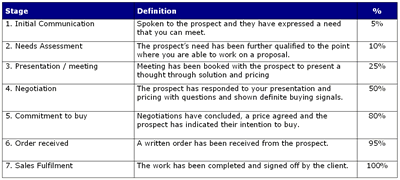
I have worked through the process with a number of clients this month. It is a 6 stage process:

  1. List the major stages that you go through when working with a sales opportunity. These should not be too detailed. For example:
    1. Initial Communication
    2. Needs Assessment
    3. Presentation / meeting
    4. Negotiation
    5. Commitment to buy
    6. Order received
    7. Sales Fulfilment
  2. Define what you mean by each stage. It is essential that all of your team understand how to classify an opportunity. For example, what has to happen when you first talk to a prospect to qualify for the 'Initial communication' stage? What has to happen for an order to be classified as 'Order Received' - verbal order or PO Number?
  3. Attach a probability to each stage. You are trying to understand what the probability is of closing a deal at any stage. For example, you might say that 10% of new opportunities turn into orders. Or that 95% of opportunities where you get a commitment to buy actually turn into an order. This is the place where you don't want to worry too much about being spot on - all you are looking for is an an approximation.
  4. Introduce a system to manage this whole process. There a many CRM systems that can do this for you but working on a tight budget one of the best is Sage ACT!

  5. Keep the results updated. A sales pipeline will only be useful if you keep it up-to-date and regularly reviewed.

  6. Refine the process. You will need to give the process some time to settle down but after a while you will want to refine the process.

You should end up with a table like this:

Sales pipeline management

If you follow these steps you will have a measurable way of tracking opportunity progress and one measure for assessing the competency of your sales people.

Thursday, 19 March 2009

On the move


I had a conversation earlier this week with a contact who was looking to get more connected. He is very successful salesman, working for a company that is bucking the downturn, but he knows he needs to stay better in touch with the office.

Whilst the web has been with us for many years, and applications have used the Internet for a good while there aren't many smaller business taking advantage of the benefits. CRM applications are particularly suited to using the web but sales people are often reluctant users. Sometimes it's a fear of the technology but most frequently it's a fear of being checked up on.

We are implementing Sage ACT! for his company that will allow them to co-ordinate all activities, keep travelling employees in touch with client activity and give the sales people access to relevant information. All for under £6k! Since their average deal size is around £20k and the average salary is £25k it wont take much to give an early ROI:


  • Increase close rate

  • Shorter lead to close time

  • Reduction in office admin time to support external staff

  • Tighter management of new leads

  • More accurate forecasting ....

Thursday, 5 March 2009

Making the most of every sales opportunity

One of the most common demands we get from new clients is that their CRM system must give them a better handle on new business opportunities.

Top sales people take a long-term view of the sales cycle. They don't get too hung up on any one stage - hitting the phones is just as important as closing deals or sending out proposals. Key to improving the efficiency of many sales teams is to model what the most effective sales people do, then replicate that process across the team. This typically involves identifying the stages that the sales people go through and what needs to be accomplished in each stage. Good sales teams invest in activities that generate sales opportunities and follow each opportunity from start to finish.

Studies of sales managers constantly report that their sales teams don't make enough sales calls to effectively discover and develop sales opportunities. The same studies show that many sales people struggle to manage opportunities as they move through the pipeline.

There are essentially three things to work on when you are managing a sales team:
  • Balance the focus between long term and short term results.
  • Apply discipline and actively manage the pipeline
  • Clarify expectations - set targets and carry out regular reviews.

Easy to say but near impossible to achieve without a CRM system such as Sage ACT! or Sage CRM.